02 Dec 2013
Last night’s episode of 60 Minutes featured an interview with Jeff Bezos, CEO of Amazon. The timing was perfect for Amazon. Black Friday was a few days ago. Cyber Monday is today. Online retailers want to be top-of-mind when people are inclined to spend money.
Amazon’s Surprise: Drones
Bezos unveiled a surprise for interviewer Charlie Rose: Amazon Prime Air, a service that will deliver most Amazon products in thirty minutes or less using a fleet of octocopter drones.
Continue reading →
30 Nov 2013
Teenagers are a tough audience. If you have ever spoken to a youth group, you know the challenge: Speak about something important without putting the youth to sleep. Tall order.
Three Stories
Boy Scout Troop 534 “Hey!” asked me to speak at the Troop’s annual reunion breakfast this year. I approached them with three stories centered around the theme of Specialized Knowledge and the Courage to Execute. What a boring title! But the three stories appealed to the group. Here’s a summary of the first story:
A tractor maker takes drastic action when when Enzo Ferrari (creator of the Ferrari sports car) pisses him off.
Continue reading →
25 Nov 2013
The Problem
Let’s say we’re building a version of Atari’s Pong in RubyMotion. We’re debugging an issue with the paddles; they don’t line up the way we want them to. Time to examine the playing field via the RubyMotion console.
Mouse over the playing field and Command-click to grab the entire playing field object in the RubyMotion console. Confirm that you grabbed the object by typing self at the console prompt.
(UIView(#9d820c0, [[0.0, 0.0], ...)> self

=> UIView(#9d820c0, [[0.0, 0.0], [480.0, 320.0]]), child of UIView(#c876920)
And then, to see what objects are on the playing field, use
self.subviews to show the subviews array of the current object.
(UIView(#9d820c0, [[0.0, 0.0], ...)> self.subviews
=> [UIView(#9d82430, [[357.0, 175.0], [50.0, 50.0]]), child of
UIView(#9d820c0), PaddleView(#9d82580, [[410.0, 190.0], [20.0, 100.0]]),
child of UIView(#9d820c0), PaddleView(#9d82970, [[10.0, 190.0], [20.0,
100.0]]), child of UIView(#9d820c0), ScoreLabel(#9d82a80, [[110.0, 9.0],
[20.0, 42.0]], text: "1"), child of UIView(#9d820c0),
ScoreLabel(#9d83c90, [[350.0, 9.0], [20.0, 42.0]], text: "0"), child of
UIView(#9d820c0)]
(UIView(#9d820c0, [[0.0, 0.0], ...)>
This blob of text is difficult for the human brain to parse.
Solution: awesome_print_motion
Now, let’s try it with the awesome_print_motion gem.
Continue reading →
23 Nov 2013
The Chicago RubyMotion User Group held its inaugural meeting this week. Thank you Dave Astels for organizing the group and for asking me to present. Thanks also to Dev Bootcamp for hosting the event.
Slides are embedded here:
Continue reading →
11 Nov 2013
There is something I neglected to cover in a previous blog post, Building an OS X App With RubyMotion. Once you’ve written the OS X app, where do you find the executable, and how do you add it to the Applications folder on the Mac?
Long-time Mac enthusiasts may already know how to do this. The information is included here for completeness.
Find, Drag, and Drop
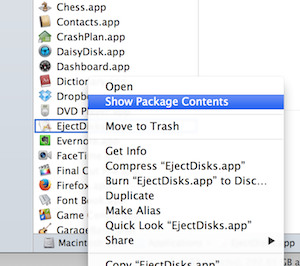
First thing to note: A Mac app named [random-app].app is actually a directory, even though it appears to be a file when viewed in the Applications folder. If you’re curious, right-click on any app in the Applications folder and choose Show Package Contents from the speed menu.
Continue reading →